Dynamic Camera Icon Behavior for Document Upload

I want to implement a functionality where users can upload or capture documents within the application. Once a picture is clicked or a document is uploaded, the camera icon should change its appearance—such as turning green or adopting a different style—to indicate that a document has been uploaded.

If the uploaded documents are deleted, the camera icon should revert to its original state. For example, as shown in the attached image, the camera icon for the COI documents turns green after an upload, while the others remain in their default state.
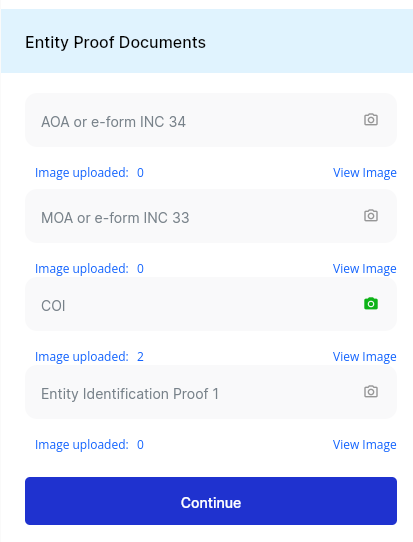
Looking forward to suggestions or ideas on how to achieve this functionality effectively!

1 Like

Hi @Ritik_Dixit,

To achieve this functionality, you’ll have to utilize the visible/invisible task with the icon, and as per your requirement, you’ll have to use two icons with different colors. And, these tasks will be mapped on the OnPageCreate event and the Onclick event of the icons.

There will be two conditions mapped for this event one for to make the green icon visible.

IF LENGTH(Images.list_entity_path) > 0 THEN
    Visible = "true"
END IF

This condition makes the green icon invisible.

IF LENGTH(Images.list_entity_path) = 0 THEN
    Invisible = "true"
END IF
3 Likes